Shipped
Redesigning the Property Finder homepage
The homepage was one static page for everyone. We rebuilt it as a starting point that changes for new and returning visitors: one search for every intent, and decision tools inside the page. It shipped on desktop and mobile web.
- Role
- Product Designer: homepage design, the search module and the component library
- Team
- One product designer, a product manager, engineers
- Timeline
- About 2 months
- Platforms
- Desktop, mobile web
- Tools
- Figma, the company design system, Claude Code with Figma's MCP
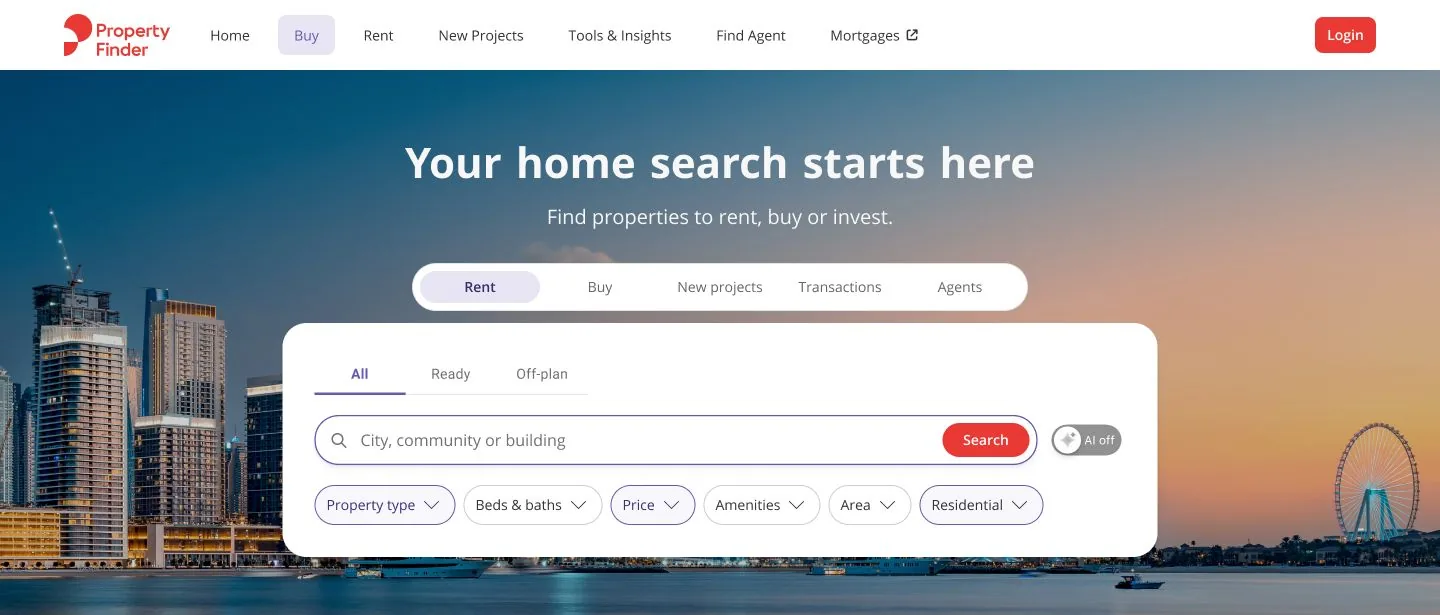
The old homepage
This was the old homepage: one page for everyone. A search box at the top, promotions stacked one after another, then a long wall of links. It never remembered anyone, and it hid the tools that help people decide.
Property Finder's mobile web had already shown that Rent, Buy and New projects shoppers need different things from the first click. We set three priorities before drawing anything.
Segment early
Rent, Buy and New projects split at the first click, each with its own criteria.
Contextual filters
A Buy search gets Buy filters, and agents and agencies still find what they need.
Search everywhere, discover more
Search stays in reach while the page brings up recent searches, picks, new developments and tools.


Two months, phase by phase
About two months from the first priorities to launch on desktop and mobile web. The component library grew alongside from the first modules, and engineering built from it.
Design
Component library
Engineering

Six problems, six decisions
Each case shows the problem, the decision and what shipped.
Case 1 Search
One search, five intents
- Problem
- Rent, Buy, New projects, market data and agents all shared one box with the same filters.
- Decision
- A tab per intent, each with its own filters: Buy adds Ready or Off-plan, and New projects swaps beds for payment plans.
- Result
- 14 search states in one component set, so engineering builds one module instead of five.
- My part
- I designed the search module: the intent tabs, all 14 filter states and the AI switch.


Case 2 SearchAI
AI search, without hiding the filters
- Problem
- People describe homes in sentences, like “2 bedroom with a balcony near the metro under 90k”, then have to turn that into six dropdowns.
- Decision
- An AI switch inside the search field, marked Beta. The sentence fills the filters people already know, so the result stays editable.
- Edge cases
- Failure states too, like “We couldn't pick this up. Try fewer words”, and an AI-off path one tap away.
- My part
- I designed the AI states, including the failure and AI-off paths.


Case 3 Search
Search that follows you
- Problem
- A richer homepage is a longer one, and every module pushed search further away.
- Decision
- When the hero scrolls away, a compact bar slides in with the field and the four most used filters, regular or AI.
- My part
- I designed both sticky variants and the hand-over from the hero.

Case 4 Personalisation
The page changes with who's visiting
- Problem
- A first visit and a tenth visit need different things. The old page couldn't tell them apart.
- Decision
- Four states: new or returning, logged in or out. Same modules, different order. Logged-out visitors see picks blurred behind Sign in, a reason to sign up that blocks nobody. A new account with no history is asked for a first search instead.
- My part
- I designed the four visitor states, the module order for each, and the locked and cold-start slots.


Case 5 Tools
Decision tools, in the page
- Problem
- Travel times, rent or buy, valuations and market data existed, behind menus most people never opened.
- Decision
- Each tool becomes a working module on the homepage. Pick a commute and see homes. Move two sliders for a rent-or-buy answer. Compare prices on a map.
- My part
- I turned each tool into a homepage module.


Case 6 Content
Marketing and product share the page
- Problem
- Campaigns, developer takeovers and product banners all wanted the hero, and photos fought the search box.
- Decision
- Fixed slots with rules: two header variants with character limits, and hero photos with a calm text zone and nothing behind the search. App download, valuation and the mortgage form stay on every version.
- My part
- I wrote the slot rules and the art-direction zones handed to marketing.


The component library
Every module was built on the company design system as one component, with a variant for each state: locked, cold start, loading, error and AI off. Each one stands on its own, so any module can sit next to any other.
Claude and Figma: I decide, Claude does the legwork
I use Claude Code connected to Figma, so Claude can read a design file and build from it. I make the decisions. Claude does the slow parts.
Concepts with real tokens
Claude read the design system's components and tokens and built clickable concepts with those exact values, so reviews happened on working pages.
Demos from the real file
For this case study, Claude mapped the design file and built the search demo here from its data, all 14 search states.
What I'd keep
Modules beat pages
Once every block stands on its own, a new order for a new audience is a change of settings.
Design the empty and locked states first
Cold start and logged out are most visits, so they get a real layout.
Give content teams rules
Hero zones and character limits kept campaigns from breaking the search.
Designed at Property Finder with product, engineering and marketing partners. Screens come from the team's design file and the live site. Business numbers and colleague names are left out on purpose. The demos are recreations for this case study, not production code.
Next case studyProperty Finder illustration and motionWant to talk about this project? Email is quickest.